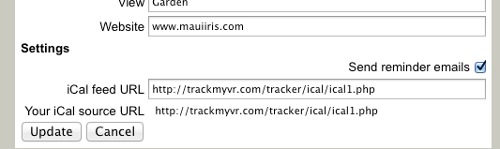
The owner settings page is where you set your contact information, your email for reminder messages, and information about your rental (for future search pages). You can also enable reminder emails to be sent, and set the iCal feed URL for your availability calendar.
You can set your iCal feed URL to be either from an external master calendar (like HomeAway, VRBO, or Google Calendar) or you can set it to your internal iCal source as shown just below the iCal feed field. Using an external iCal feed will show reserved dates on your availability calendar as they appear on that external calendar. To get these reservations into the tracker database, you have to click on the arrive date in the calendar, and click the “track it” button to create a reservation in the database. Until you have done that step, reservations on the calendar are not tracked in the database and are not supplied as part of your internal iCal source. Once a reservation has been created either from the external iCal feed as described above or simply added with “new reservation” it will be tracked and sent out as your iCal source. You can use your iCal source as a master calendar to feed other iCal calendars you may have.
Many rental calendar programs on the Internet work with booked nights rather that arrive and depart dates. This means that they do not include the last depart day in the calendar information. This is the format that VRonTrack normally expects, and outputs as your iCal source. If you are using a calendar as your master calendar that does output the depart day, you can set “Show end date available” to make VRonTrack not show that end date as booked and unavailable. This will allow you to have same day turn-overs. If you want VRonTrack to output the depart day in your iCal source, you can use the alternate iCal source URL that has the word ‘days’ in it like
http://VRonTrack.com/icaldays.php?id=1
To get the iCal feed from a HomeAway or VRBO calendar, follow the instructions here.
To get the iCal feed from an AirBnB calendar, follow the instructions here.
To get the iCal feed from a Google calendar, follow the instructions here.