The rates settings page lets you setup how quotations will be calculated.
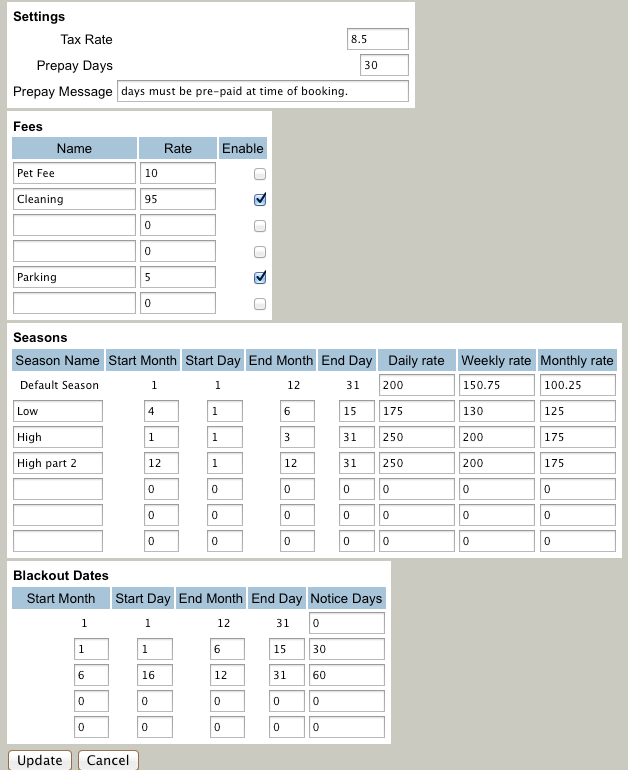
Tax Rate
This percentage will be applied to the subtotal to form the total amount.
Prepay days
If you require pre-payment if the arrive date is less than a certain number of days away, then enter a non zero number of days here and a warning message will appear when making the quotation.
Fees
Up to 6 extra fees can be set. These will appear on the quotation page and will be added to the fee subtotal if the fee check box has been checked. They will also be individually broken out in the rate summary that becomes part of the quotation email. Use the enable setting to set if that fee starts off initially checked or if it should be initially off and must be checked to add it to the fee subtotal. To disable a fee set a rate of zero.
Seasons
In the standard rate computation algorithm, the arrive date is checked to see if it falls into one of the defined seasons. The rates set in that season are used, and are applied to the number of nights comprised in the reservation. The daily rate is used for stays less than 7 nights. The weekly rate is used for stays of 7 to 28 days. The monthly rate is used for stays over 28 nights. If the arrive date does not fall into one of the defined seasons, then the default season rates are used. You can not enter an end date that is earlier than a start date. If you have a season that spans the end of one year and the start of the next, you must create two seasons, one for the dates to the end of the year and another for the dates from the start of the year using the same rate values. To disable a season set any of the date values to zero.
Black out periods
If you have times during the year where you are restricted from taking reservations less that a certain number of days away, you can enter those times and the number of notice days. If the arrive date is less that the notice days away from one of your black out times, a warning notice will display (to the owner only) when making the quotation.