The tracker page shows all reservations entered into the tracker. It shows one page for each year. The next and previous year buttons at the bottom are used to scroll between year pages. The reservations are listed in order of arrive date. By default, each reservation is displayed with the first and last name, arrive and depart dates. Clicking on the name will bring up the details for that reservation where you can add or edit information, send emails to that guest, or delete the reservation from the tracker. For each tracker category, the trackers page will show a column with the category name, and if a URL was supplied when you created the category, the name will be highlighted. Clicking on the category name will open a web browser page to that URL. This gives you a quick way to get to other web pages that you need to manage like PayPal, or another master calendar site. New reservations can be added to the tracker by going to the new reservation page.
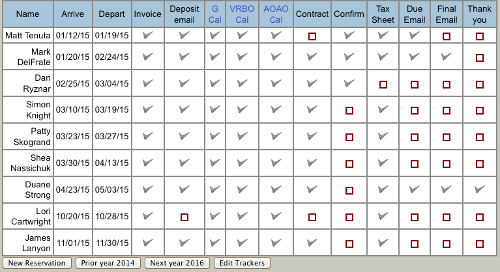
Each box on the tracker page lets you mark off categories as done for each reservation with a check mark. If you have set reminder days on the category, the box will turn yellow to let you know it is overdue if it has not been marked done. If you have enabled reminder emails, those items will be sent to your email inbox every night to remind you until they are checked done.