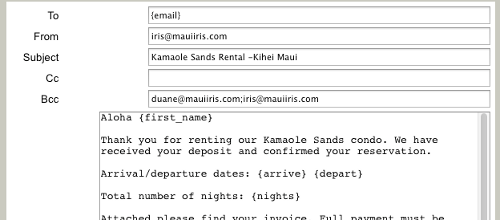
When sending emails from a reservation you can create or edit email templates. Email templates are used to send emails where you supply a standard block of text, email addresses, and subject but parts of those can be filled in with data from the reservation. This is done by inserting special keywords into your template text. Keywords have braces around them {like_this} and will be replaced by the data named in the keyword. You can use the blank email form to send an email (although this does not gain you much over just using your normal email program) or you can click on the “use” button of one of your email templates to have that template filled in with the reservation data.
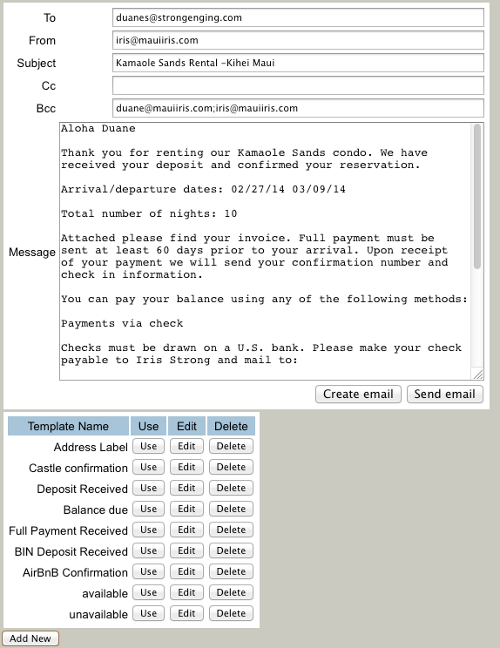
Clicking “Add New” at the bottom of the page will add a new template named “new template”. Clicking on the “Edit” button of the new template will let you edit the standard text and keywords of the template. The “Insert Field” button will dropdown to show a list of available keywords, and if one is selected it will be added to the end of the current message text, or you can just type them in. You can use keywords anywhere in the message text, to, from, subject, cc or bcc fields or you can just put in whatever text you want to always use. Before you click the “Save Template” button you can change the name of the template as it will appear in the list.
When you use an email template you have options on how you would like to email it. Your first option is to edit the text in the message box any way you like before sending it. You can change what was created from the template, add extra info etc. You can cut and paste this text into an existing email thread.
Create email” vs. “Send email” buttons
The “Create email” button will launch the local email program on your computer and fill in a new email with the template information.
- + Uses your favorite email program to send the email
- + Allows you to attach files to the email
- + Keeps a history of sent emails on your computer
- – Requires that your computer be setup with an email program
- – Requires that you navigate through your email program
- – Has problems in some versions of Chrome browser
The “Send email” button will use our server to send your email as if it came from you.
- + Can be used from any computer even in public kiosks
- + No setup required
- + Fewest clicks to send an email
- + Works in any browser
- – Can not attach files to the email
- – No history of sent emails kept (but you can bcc to your email account)